How to install Wazuh server and agent on ubuntu in 5 minutes

Mivocloud

Active member
Surely you heard about Wazuh. Wazuh is a free and open source security platform that unifies XDR and SIEM capabilities. It protects workloads across on-premises, virtualized, containerized, and cloud-based environments.

Commands Used:
sudo apt update && sudo apt install curl apt-transport-https unzip wget libcap2-bin software-properties-common lsb-release gnupg2
curl -sO https://packages.wazuh.com/4.5/wazuh-install.sh && chmod 744 wazuh-install.sh && bash ./wazuh-install.sh -a
 
Thanks for sharing Anatolie, Your post encouraged me to check it out again - i followed your commands worked on with Ubuntu 24 (1 vCPU and 4GB memory) - only change was to add 4.9 (latest version) then apply SSL for the subdomain selected - here are the details in case it helps someone else: (note change sub-domain) to your own

apt-get install snap
snap install core; snap refresh core
snap install --classic certbot
certbot certonly --standalone -d
cp /etc/letsencrypt/live/subdomain/privkey.pem /etc/letsencrypt/live/subdomain/fullchain.pem /etc/wazuh-dashboard/certs/
cp /etc/letsencrypt/live/sub-domain/privkey.pem /etc/letsencrypt/live/sub-domain/fullchain.pem /etc/wazuh-dashboard/certs/
apt install vim -y
vim /etc/wazuh-dashboard/opensearch_dashboards.yml
chown -R wazuh-dashboard:wazuh-dashboard /etc/wazuh-dashboard/
chmod -R 500 /etc/wazuh-dashboard/certs/
chmod 440 /etc/wazuh-dashboard/certs/privkey.pem /etc/wazuh-dashboard/certs/fullchain.pem
systemctl restart wazuh-dashboard
 

Attachments

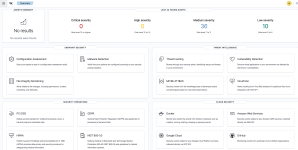
  • wazuh-dashboard-fresh.png
    wazuh-dashboard-fresh.png
    565.5 KB · Views: 6

Part 1: Install Wazuh Server (All-in-One)​

This installs Wazuh Manager + Indexer + Dashboard on one Ubuntu server.

1️⃣ Update system​

Code:
sudo apt update && sudo apt upgrade -y

2️⃣ Install required packages​

Code:
sudo apt install curl apt-transport-https lsb-release gnupg -y

3️⃣ Download and run Wazuh installer​

Code:
curl -sO https://packages.wazuh.com/4.7/wazuh-install.sh
sudo bash wazuh-install.sh -a
⏳ This takes a few minutes.

4️⃣ Get dashboard credentials​

After install finishes:
Code:
sudo cat /var/ossec/logs/wazuh-install.log | grep -i password
You will see something like:
Code:
User: admin
Password: xxxxxxxxxx

5️⃣ Access Wazuh Dashboard​

Open browser:
Code:
https://YOUR_SERVER_IP
⚠️ Accept the self-signed certificate warning.

Part 2: Install Wazuh Agent on Ubuntu​

1️⃣ Add Wazuh repository​

Code:
curl -s https://packages.wazuh.com/key/GPG-KEY-WAZUH | sudo gpg --dearmor -o /usr/share/keyrings/wazuh.gpg
echo "deb [signed-by=/usr/share/keyrings/wazuh.gpg] https://packages.wazuh.com/4.x/apt/ stable main" | sudo tee /etc/apt/sources.list.d/wazuh.list
sudo apt update

2️⃣ Install agent​

Code:
sudo apt install wazuh-agent -y

3️⃣ Configure agent to point to server​

Edit config:
Code:
sudo nano /var/ossec/etc/ossec.conf
Find <server> section and set:
Code:
<server>
  <address>WAZUH_SERVER_IP</address>
  <port>1514</port>
  <protocol>tcp</protocol>
</server>
Save & exit.

4️⃣ Start and enable agent​

Code:
sudo systemctl daemon-reload
sudo systemctl enable wazuh-agent
sudo systemctl start wazuh-agent

Part 3: Register Agent with Server​

On the Wazuh Server:
Code:
sudo /var/ossec/bin/manage_agents
Steps:
  1. Press A → Add agent
  2. Enter agent name
  3. Enter agent IP
  4. Confirm
  5. Press E → Extract key
Copy the key.

On the Agent machine:
Code:
sudo /var/ossec/bin/manage_agents
  1. Press I → Import key
  2. Paste the key
  3. Restart agent:
Code:
sudo systemctl restart wazuh-agent

Part 4: Verify Agent Connection​

On server:
Code:
sudo /var/ossec/bin/agent_control -l
Or in dashboard:
Code:
Dashboard → Agents → Active

Optional (Highly Recommended)​

Open Firewall Ports​

On server:
Code:
sudo ufw allow 1514/tcp
sudo ufw allow 1515/tcp
sudo ufw allow 443/tcp
sudo ufw reload

Common Issues​

IssueFix
Agent not connectingCheck firewall & IP
Dashboard not loadingEnsure port 443 open
High RAM usageIndexer needs ≥4 GB RAM

Minimum Requirements​

  • Server: 4 CPU / 8 GB RAM (minimum 4 GB)
  • Agent: 1 CPU / 512 MB RAM
 
Nowadays , you can probably get chatGPT to make you a 'client.sh' script, for using on any linux environment supporting shell/bash - and also a powershell one for windows devices.

I use Wazuh , love it ! I have pi.hole for DNS management so i manage an internal CNAME which is the wazuh domain
 
Back
Top