• 🎉 Big News: Circle City Servers is backing our CloudFest Americas coverage. Read more

Feedback & Advice on our rebrand design

Dear Hosting Discussions,

I built our original site back before 2021 when we first launched.

I’ve always appreciated the feedback and advice from this community, and I would love to hear your thoughts on our new brand image and website design.

We built this design from the ground up over the past few months using Tailwind CSS. It brought a few challenges, but we overcame them and are now set to launch on September 18th, 2026.

As part of this update, we will be transitioning from our old red theme to a sleek dark mode with orange brand accents.

Our redesigned website introduces several key upgrades and features not available on our current site:
  • UI & Design: Loading wheel on page load, Smart cookie notice which is more compliant, Custom scroll bar to our new brand colours, No page shift between frontend site and backend client portal (Plus moving from billing. to my. domain for our client area)
  • We added a range of new site features like adding a business phone number, security notifications sent to users when someone logs into their account, PayPal checkout upgrades allowing for more seamless checkout process, support pin integration for the new phone support.
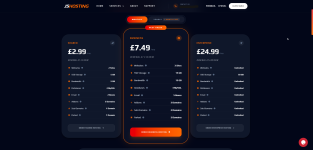
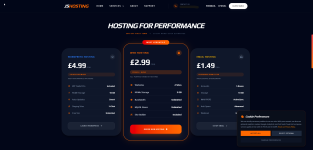
  • Package layout improvements: Monthly and Yearly pricing viewable on the frontend pages, added package specific technical details to give more info on our hosting packages.
  • Custom server status page on the main front end website (Allowing users to view live server outages without having to login)
  • Client area has been overhauled, with custom login page, stripped down homepage to match our frontend site and other custom elements like custom plan layout for hosting selection within the client area.
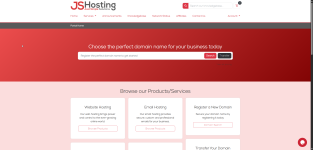
Preview images comparing the old and new designs are attached below.

I would love to get your feedback on the new design before our official launch on September 18th!

Rebranded front page:
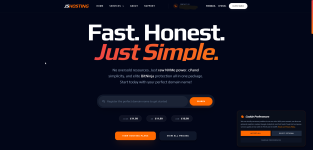
chrome_gmfc4hbaJY2.png
chrome_dtifV57PLb.png

Rebranded Client Portal Integration:
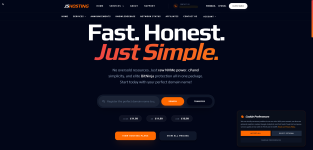
chrome_JtcMT09h8u.png

Our original website design:

Website Front page:
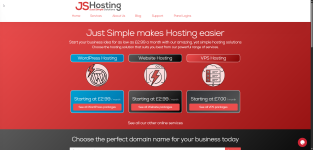
chrome_uwxbler0b3.png

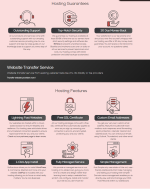
Original Client Area Design:
chrome_vy6k15vJCR.png
Ou
 

Attachments

  • chrome_hWcloAe3cM.png
    chrome_hWcloAe3cM.png
    211.3 KB · Views: 4
Looks cleaner for sure!

Be careful about removing the text boxes that you had originally for web hosting, email hosting etc. Those paragraphs are key items that search engines love to read. While you move to a bullet-point setup, it can potentially hurt your overall seo as you've pretty much stripped all text from the site and made it bullets/columns - no longer sentences.

A workaround is to add a FAQ area or expander boxes further down the page with content for search engines and AI to get a hold of.

Looks like a nice rebrand though!
 
Thanks @bigredseo I appreciate the feedback. I've spent countless hours working on the new design and integration with our client portal.

Regarding the text boxes you mentioned, are you referring to these:
chrome_gtSUyB5Jk0.png

We've included them across each product page, similar to before, but with updated layouts and expanded content:
chrome_aUM3Q9ofT2.png

We do have an FAQ, but it's currently on our About Us page rather than the product pages. Would you suggest adding it to each product page, or creating completely custom FAQs tailored to each specific product?

chrome_sBfc7PZcOg.png
 
Ah, great. Yes, as long as you have the text, that's good.

For FAQ, any product page that can include a FAQ is more content that the systems can use. As you thought, it should be tailored to the page itself. If they want to read the About page, they'll go there for basic info and FAQs, but if they're on a product page, the questions and answers should be about that product. Also, include a "why this product vs that product" and then you can link to one of your other plans. Then also include a "when it's time to upgrade" or "why you should look at XYZ" and link to those too.

Be careful not to use the same content on all pages - it's not because of duplicate content, but because your users may read one product, then see the same Q&A on the next page and just think it's all fluff. Make them unique and related to the product.

The final item I'd put on the list would be to check from an accessibility standpoint. I know you have the black background and the grayish text, but there could be a case where there's not enough contrast. There are online scans you can run to see if you're within tolerance. The quick fix is to have a button option to change to a light background/theme. I like black backgrounds as much as the next person, but sometimes my eyes get tired and I have to swap the colors. I have a Chrome plugin that does that for me, but most users wouldn't have that installed.

I think you're very much on the right track with the new layout! Nice work!
 
Thanks for the advice and clarifying my question, @bigredseo .

I will get individual FAQs added to each product page, hopefully before launch day.

One of my other main concerns with the original website apart from it being dated was SEO, so I will make sure this is fully addressed.

I did havve accessibility concerns when I first started building out the site.

I initially tried to bake light mode in while building, but had trouble getting it to work correctly.

However, I've just spent a few hours testing and managed to implement it smoothly across the front end, which is fantastic.

You can check out a quick screen recording here to see it in action: https://share.jshosting.co.uk/images/HLDcH33Yf7CevsM8JRFVsi2f4.gif

I have a few more hours to spend adding custom light mode elements for the client area, which shouldn't take too long. Hopefully!

Thank you again for the feedback.

You helped me out with my old design a few years back and were fantastic to work with.

I may reach out to you directly for SEO services once we get this big update rolled out!
 
Looks great, and that swap to the light background makes a world of difference. The only suggestion would be maybe to make it an off-white, but I like it! When you change modes and move to a new page, does it remember the mode? Also, was this a plugin that you used or something hard-coded in the site?

Good luck with the launch; I hope it delivers fantastically!
 
Back
Top